Showing posts with label hacking seo. Show all posts

Monday, May 23, 2011

What is PageRank

As I already mention Here  about how to create backlinks now today I am gonna discuss Page rank with you people..

PageRank is a link analysis algorithm, named after Larry Page[1] and used by the Google Internet search engine, that assigns a numerical weighting to each element of a hyperlinked set of documents, such as the World Wide Web, with the purpose of "measuring" its relative importance within the set. The algorithm may be applied to any collection of entities with reciprocal quotations and references. The numerical weight that it assigns to any given element E is referred to as the PageRank of E and denoted by PR(E).
The name "PageRank" is a trademark of Google, and the PageRank process has been patented (U.S. Patent 6,285,999). However, the patent is assigned to Stanford University and not to Google. Google has exclusive license rights on the patent from Stanford University. The university received 1.8 million shares of Google in exchange for use of the patent; the shares were sold in 2005 for $336 million..


Mathematical PageRanks (out of 100) for a simple network (PageRanks reported by Google are rescaled logarithmically). Page C has a higher PageRank than Page E, even though it has fewer links to it; the link it has is of a much higher value. A web surfer who chooses a random link on every page (but with 15% likelihood jumps to a random page on the whole web) is going to be on Page E for 8.1% of the time. (The 15% likelihood of jumping to an arbitrary page corresponds to a damping factor of 85%.) Without damping, all web surfers would eventually end up on Pages A, B, or C, and all other pages would have PageRank zero. Page A is assumed to link to all pages in the web, because it has no outgoing links.

Monday, February 21, 2011

Bing Sending More SEO Traffic Than Yahoo! Search?

With some lower traffic smaller sites it is easy to get outlier data that is skewed & somewhat irrelevant (especially true if you have a website which happens to have relevant content in a category that Ask is spamming the heck out of Google in), but one nice thing about comparing Yahoo! and Bing against each other is that they are generally driven by the same relevancy algorithm. Of course Yahoo! and Bing may have different promotions added to their interfaces for certain query types, but if you take websites that are ranking for a wide basket of keywords you can generally see how the search engines are doing against each other at driving traffic.
Some categories (think mom from the mid-west who is a casual internet user) might have a bias toward using Yahoo! Search, but outside of areas where you might expect that sort of skew, I am seeing Bing drive more organic search traffic than Yahoo! is. Here are analytics images from 3 different websites so far this month that get quite a significant search traffic stream. These sites target different demographics from people in their 20's to 30's to 40's. And all 3 of them are getting more search visits from Bing than Yahoo! Search. And, looking at the data, this shift has been fairly significant over the past couple months.

This site gets tons of longtail traffic & ranks across a wide array of keyword.

This site is primarily driven by a few popular keywords & ranks #1 in both Bing and Google for them.

The reason this 3rd one is so Google heavy is because the Google algorithm likes the older site more & it does not have as many fresh links (which Bing seems to like more). It is primarily focused on a few core keywords where it ranks #1 to #3 in Google and #4 to #7 in Bing.
I suspect that Bing is still somewhat more selective with showing search ads than Yahoo! is (as Microsoft's online operation has been losing billions of Dollars per year & Bing is trying to win marketshare from Google, whereas Yahoo! is all about maximizing revenues per search). Yahoo! ads likely get a greater portion of the search clicks due to...
  • ads being shown more frequently & more aggressively
  • ads taking up more visual space (when Bing puts 4 ads above the organic results they put the URL and the description on the same line, whereas Yahoo! spreads them out across multiple lines)
Since Bing is sending more searchers onto the organic search results it means their real search share is over-represented if you look only at organic search visitors, but then as an SEO that is the main thing you are looking for - opportunity. It is a bit of a shame that on the above sites Google is still driving ~ 84% of search visitors, whereas Bing is still in the 16% range.
As Google comes over the top to bury the organic results by...
  • expanding the default AdWords ad units to have longer headlines and a boatload of extensions
  • entering broad consumer verticals like books and finance and offering customized local results
  • running self serving ads in a bunch of categories like project management and even wedding planning
...they kill a lot of opportunity as their ecosystem becomes more closed and perverted.
If the trends hold true, then in some cases it seems like Google might drive SEOs below the fold for core keywords while still pushing strong traffic into tail. Bing still doesn't have the index depth to match Google's relevancy on longtail keywords, but at least they are not crowding out the organic results anywhere near as aggressively on core keywords.
How are you seeing Bing fare against Yahoo! & Google? Are you seeing growth from Bing? What sorts of sites are you seeing Bing do well on & what sorts of sites are you seeing Bing do poorly on?
Update: It appears this sharp increase in Bing traffic over the past month has been driven by a partnership with Conduit.

What Are Backlinks And Why Are They Important?

One of the biggest search engines out these days is Google. Google ranks using content, formatting, and linking. The higher that Google calculates the 'quality' of your website, the higher your ranking will be in Google searches. One way to have your website seen as high quality by Google is to have other websites link to it. This is known as backlinking (thus "how to create backlinks").
In this article I will show you how to create backlinks to your website and have it indexed by Google a bit faster (usually). This is by no means meant to be a long and wordy novel on the joys of how to create backlinks. What I'm hoping is to give some simple steps that you can take to jumpstart your site on Google using backlinks. Please comment and let me know if this article was of any help!
(To recap: Backlinks are links from other sites to your websites. Backlinks are important because good backlinks increase your ranking on Google searches.)
NOTE: Nothing beats having great content! Make sure that you have something that will catch people's attention. What good is a link to something that doesn't make people want to keep coming back to your site?
Property of surely at www.everystockphoto.com.

1: Current High PR Websites

There are already plenty of sites that rank highly on Google. Why not use these to boost your site's ranking? Here are 3 ways to create backlinks from these websites:
  1. Post regularly and then ask for a link, or post a link eventually. Make sure that you add information and quality to their site before trying to create a backlink from it. (No one likes a freeloader!)
  2. Find older, high PR sites that still have guestbooks setup. Simply enter a nice comment that features links to your website.
  3. Search in Google for high ranking blog sites that feature comments by typing in "[your keywords here]" "powered by wordpress" "leave a comment" -"no comments". Once you gain some results, go through the sites and make sure that they do not have the "no follow" code. (you can do this by pressing "Ctrl+U" then "Ctrl+F". Type in "nofollow". If the word search finds "nofollow" in the website code, then you are unable to add a link. Otherwise, you should be good to link to your website.)

2: Social Bookmarking Sites

A VERY good and popular way to get your website listed on Google is through social bookmarking websites such as Digg.com. Not only do these sites give your website exposure, but they also create tons of backlinks. These sites are indexed by Google pretty regularly, and so your submissions stand a good chance of being indexed quickly. 3 simple steps of getting setup on social bookmarking sites are:
  1. If it applies, make sure to optimize your article / post headlines for maximum interest. (see: "10 Surefire Headline Formulas That Work")
  2. Got to www.socialmarker.com to sign up for, and submit your website to, social bookmarking sites
  3. Make sure to submit your major articles and posts (but don't overdo it!).
  4. Make sure to add friends and comment on other posts / articles. The more friends that you have, and quality posts and votes that you've made, the more chance you have to get traffic (and backlinks) to your website.

3: Hubpages & Squidoo

Squidoo and Hubpages are both websites that provide users with one webpage to write about any topic. This is pretty useful since, just like the social bookmarking sites, these sites are indexed regularly and rank pretty high on Google. A good strategy is to submit articles, that include links back to your website, to these sites as pages. Submit articles with enough quality and people will link back to your squidoo and hubpages sites.

4: Video Marketing

Video Marketing is a great way to advertise and create backlinks. A Secret: There is usually a lot less competition for the ranking of videos in searches, than the ranking of websites. So there is A LOT of potential to get yourself noticed. Not only will people link to and view your videos, but they will sometimes put your videos on their websites as well! 3 steps to creating backlinks through videos are:
  1. Sign up for the video website and enter information about your website in your website profile.
  2. Post funny, shocking, or informative videos that have to do with your website. make sure to use software like Camtasia to edit the video so that it includes a branded watermark (An example: BigBadBully: Teach Your Dog To Sit).
  3. Make sure to also post your videos to your blog or website with added text.
(YouTube and Google Video are great websites to create backlinks)

5: The Basics

Another option is going back to the basics with text link trade. I'm not talking about the trades that you're used to. This linking system basically adds links to sites that choose to have a link posted from your website. The good thing about it is that the code that THEY use will include a backlink to your site. The code that the person who clicks through their site will use will have a backlink to your website as well. Check it out at.
Binary Traffic

6: Get Creative!

Some creative ways to create backlinks include:
  1. Create Software that includes links to your website.
  2. Create Plugins that include links to your website.
  3. Create Website Code that includes links to your websites.
  4. Create Website Layouts / Templates that include links to your website (can you imagine how many backlinks this could make for you?!).
  5. Donate To A Non-Profit Organization / Cause that posts up informatin about people who make donations. Have them post up information about your website.
  6. Answer questions on "Yahoo! Answers" and other "answer sites". Make sure to put a link to your website in your answer (preferably to an article or page on your site that addresses the question).
  7. Join Twitter and have it follow your posts.
  8. Create a Myspace And Facebook Profile for your website.
  9. Be a guest author on blogs and news websites.
  10. Create an online forum or Yahoo/Google group.
  11. Create an ebook, that has plenty of links to your website, and that you can give away for free.
  12. Submit your site to web directories.
  13. Link inside of craigslist ads.
  14. Link inside of forums.
  15. Join the BBB (Better Business Bureau).
  16. Network with friends and local businesses for links.

Links


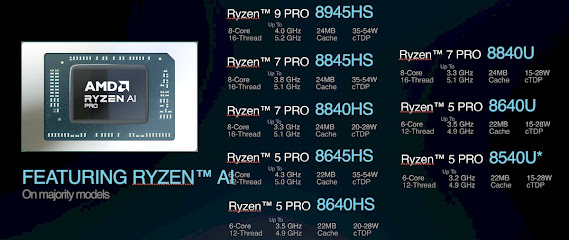
Unleash the Power of AI: AMD Ryzen 8000 Pro Processors Take Productivity to the Next Level

Get ready to supercharge your professional workflow with the arrival of the all-new AMD Ryzen 8000 Pro processors! Building upon the foun...