To convert a FAT partition to NTFS, perform the following steps.
1) Open 'Command Prompt'.
2) At the command prompt, type the following-
CONVERT [driveletter]: /FS:NTFS.
'Convert.exe' will attempt to convert the partition to NTFS.
NOTE :- Although the chance of corruption or data loss during the conversion from FAT to NTFS is minimal, it is best to perform a full backup of the data on the drive that it is to be converted prior to executing the convert command.
Showing posts with label fat to NTFS conversion. Show all posts
Showing posts with label fat to NTFS conversion. Show all posts
Wednesday, December 16, 2009

Subscribe to:
Posts (Atom)
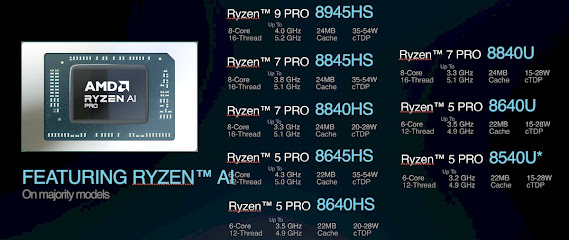
Unleash the Power of AI: AMD Ryzen 8000 Pro Processors Take Productivity to the Next Level
Get ready to supercharge your professional workflow with the arrival of the all-new AMD Ryzen 8000 Pro processors! Building upon the foun...
-
This is what you like to call "Hacking a forum". I call it "Cracking into a forum" ... Learn what hacking mea...
-
The world of computer technology is constantly evolving, and 2023 is no exception. Here are some of the latest trends and developments to wa...

